TFX model resources
Open the model browser directly in a browser. It is self-contained, works from a local file and requires no server or external JavaScript libraries. The dataset comes from the September 1994 TFX 2.05 DID archive; regenerate it with python3 tools/decode_models.py.
Structural inspection identifies 1,012 model resources: 862 have a single candidate filename in the 3/ namespace, and 150 remain unidentified or ambiguously named. All 374 extracted files already named 3/*.3 are included. Identifiers and paths remain visible so that future name corrections need not change which resource is being studied. These are resource counts, not counts of distinct aircraft or unique meshes: the archive also contains scenery, effects, cockpit parts and variants.
The browser provides rotation, zoom, pan, palette selection, authored detail levels, facing rules, labelled parameter controls, state playback, animated effects and OBJ/MTL export. Gallery thumbnails follow the main preview’s rotation and display settings live, retaining their own framing and base parameter pose. Only visible and nearby tiles redraw, including when paging is disabled. Its initial selection is the F-22. Export uses the selected detail level and parameter pose with screen-winding rejection and facing branches disabled. A facing branch follows its fall-through path; export does not merge every alternative drawing routine. Exported coordinates use inspection units, not a verified metre conversion.
Grouping by use
The model browser has a hierarchical Use filter and an independent Names filter. Uses cover aircraft, surface units, fixed scenery, cockpits, weapons/stores and effects. Models can belong to several groups; for example, a parked vehicle can also be referenced by a fixed terrain assembly. Unidentified names and unassigned uses are separate questions.
The current pass assigns 812 of 1,012 models, leaving 200 without a confident group. The groups include 609 fixed-scenery models, 69 weapons/stores, 64 effects, 42 surface-unit models, 35 aircraft and nine cockpit models; counts overlap. Fixed scenery has terrain/vegetation, town/city, individual buildings, roads/rail, water/coasts, bridges/docks, industry/facilities and airfield/runway subgroups. Cockpits separate ordinary virtual interiors, rear views and the three air-to-air refuelling *_f models.
Classification uses four sources:
- Native
craftype.cfgprofiles and the model assignments in their SSD assemblies. - Terrain variants referenced by used grid tiles, their SSD parts, and original authoring folders retained in
.ascfiles. - The native 27-entry weapon table, its loadout models,
x-prefixed fired definitions and secondary definitions. The original loader normalises these names to eight characters. Missile/bomb/store labels use the identified table entries; the raw weapon-class byte is preserved without assigning an undocumented enum. - Identified model families and explicit naming conventions for retained variants, cockpit parts and visual effects. These are labelled separately from native references. Numbered scenery siblings can inherit a likely role from a referenced family member, without being asserted to appear in current missions.
The selected model also lists links to every decoded SSD assembly referencing it in Assembled scenery & actors below the preview. Each link opens the corresponding assembled-definition view and lists the part slots, distinguishing the initial draw assembly, initially loaded but hidden parts, and assignments in decoded event/conditional code. This includes smoke, fire and other helpers as well as definitions not selected by current terrain maps; a decoded reference does not prove mission reachability.
The selected model shows clickable usage tags and an expandable evidence list. usage.json retains the complete mapping and weapon table. Native checks verify all 54 projectile-definition load requests, all 54 native name normalisations, and representative model/category relationships. Seven terrain-variant references do not resolve to a decoded SSD and remain listed in the report.
The classifier is part of the analysis rebuild. Category assignment does not change model geometry or claim that every retained variant is reachable in normal gameplay. Text search includes known-use evidence, with direct model-name matches ranked first.
Coordinates and display orientation
Native model coordinates use X laterally, Y vertically and Z longitudinally. Negative Y points upwards; the aircraft models point their noses towards positive Z. The model browser and thumbnails preserve that convention when projecting onto the canvas, whose positive Y also points downwards. The camera initially looks towards the origin from the positive-Z side; screen X is reversed relative to native X so that lateral details and face winding retain their handedness. The assembled scenery viewers use the same native coordinates and orientation. The Eurofighter refuelling boom and carrier island provide recognisable checks of the lateral orientation.
The viewer normalises components with differing camera-translation scales to the units associated with the resource’s first opcode 48, or scale 1 when it has none. This gives one consistent model-space scene and preserves relative component sizes. Assembled scenery and actor previews instead supply reference scale 1 so separately authored shapes, attachment anchors and collision boxes all share native world units; the standalone convention must not be used to place models on a map. The original raw vertex operands remain in the decoded instructions.
OBJ exports retain these native axes and include an explanatory comment. An importer assuming positive Y upwards will need a coordinate-system conversion; the exported mesh itself is not pre-flipped.
Parameters and state playback
Each model part has eight parameter bytes. Opcode 72 selects one of those bytes for subsequent conditions; helpers can change the selection, and their calls do not restore it. The meanings are conventions of the individual drawing program rather than a universal parameter enum. In particular, parameter 0 can describe aircraft landing gear, a rotating radar dish or a missile-launcher mechanism.
The browser now exposes 527 controls across 382 models, with derived useful ranges for 526 controls. The analyser follows helper calls and returns across all polygon detail levels, associating comparisons with the selected byte. A state > 6 final branch needs state 7, not just the literal comparison value 6. Equality switch tables expose their explicitly authored states; an unmatched value is not automatically another animation frame. helcpter selects byte 7 without a recovered comparison; that control retains its full byte range and is marked unconfirmed. The former warning for unnamed model 92303253 was resolved by retaining its executable 0xffff return sentinel, as both the native conversion and drawing tables do.
Controls with exactly two authored drawing states use an on/off checkbox, such as Damaged / destroyed, Gear lowered or Bays open. It switches directly between the two state boundaries, including switches with thresholds above 1, such as the Eurofighter probe's 0/6 values. Single-bit controls also use canonical off/on values through toggle_states, while retaining their full raw predicate metadata. These controls have no timed playback or loop. Fit both states frames both poses.
Multi-stage landing gear, weapon bays and identified refuelling mechanisms use forward/reverse buttons such as Extend / Retract or Open / Close. Each direction holds its endpoint when finished. Optional Back and forth repetition reverses direction at each endpoint instead of jumping from maximum to zero. Continuous dish and radome rotations loop by default. Other multi-stage effects, damage, ejection and cargo-drop sequences play forwards once by default; their Loop option remains available for repeated inspection, and Replay states starts a completed sequence again. A cargo-drop or parachute-release sequence is not automatically played backwards.
The slider and number field remain available for multi-stage and unconfirmed controls. Playback retains other parameter values, and changing the selected control stops playback. Fit state range frames the selected sequence, including particle radii. Steps/s sets an inspection rate, defaulting to 4; it is not a reconstruction of the original controller's timing. Some consecutive scalar values intentionally select the same drawing stage and retain those holds during playback. Indexed tables skip gaps between their authored values; manual entry snaps to the nearest authored state. Playback remains disabled for controls whose range is unconfirmed, while their raw byte values stay editable. Generated playback metadata describes this inspection policy; it is not an encoded native model flag.
Useful observed examples:
| Model | Parameter | Meaning | Useful range |
|---|---|---|---|
ok |
0 | Landing gear, raised to lowered | 0–7 |
f_22 |
1 | Weapon bay doors, closed to open | 0–3 |
f_117a |
1 | Weapon bay doors, closed to open | 0–5 |
f117 / f22 |
2 | Refuelling connection | 0–2 |
f117 / f22 |
5 | Separate smoke-particle trail | 0–8 |
f117 |
6 | Braking parachute | 0–7 |
f_117a / f17_eje |
6 | Braking parachute deployment and release | 0–5 |
fuel_f17 |
6 | Braking parachute switch | 0–1 |
F-22 variant 9d6cc0b1 |
1 | Weapon bay doors; its only parameter | 0–5 |
Hercules variant a2bf72ca |
1 | Tail door followed by cargo drop | 0–11 |
herky |
1 | Tail door followed by a late cargo-drop sequence | 0–254 |
xattlesh / battlesh |
0 | Shrinking horizontal diamond effect | 0–110; visible only at 107–109 |
samdish |
0 | SAM radar dish rotation | 0–19 |
ss1_scud |
0 | Missile lift followed by lowering the raising arm | 0–36 |
ian1 |
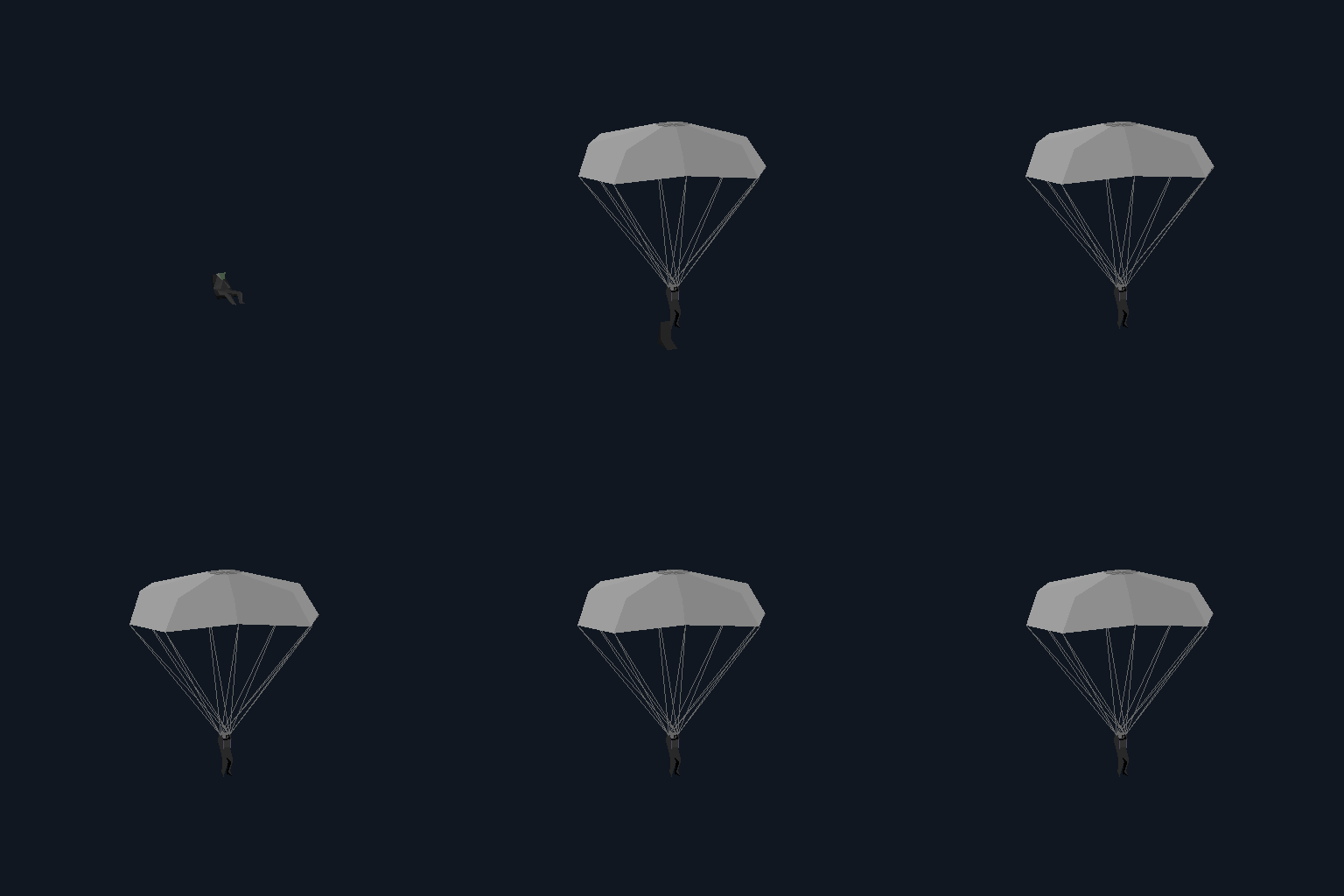
0 | Pilot ejection, parachute deployment and seat separation | 0–19 |
airaew |
6 | AWACS radome rotation | 0–35 |
fire_10 |
7 | Increasing smoke build-up | 0–13 |
exp_mg21 |
7 | Explosion and subsequent smoke stages | 0–8 |
bridge5a |
7 | Intact / destroyed switch | 0–1 |
efa |
0 | Landing gear | 0–7 |
efa |
2 | Refuelling probe | 0–6 |
efa |
3 | Engine / afterburner effect | 0–4 |
efa |
4 | Ejection sequence | 0–6 |
efa |
6 | Braking parachute deployment and release | 0–5 |
ok |
4 | Ejection sequence, including initial holds | 0–19 |
ok |
6 | Wingtip vortex sequence | 0–15 |
On the Eurofighter model efa, parameter 2 extends the refuelling probe: values 0–5 retain the retracted drawing and 6 or higher select the extended one. Parameter 4 selects the ejection sequence over 0–6. Parameter 6 deploys the braking parachute at 1, opens it at 2, then shows it separated and moving away at 3–4; 0 and 5 or higher show no parachute. This differs from ok, whose parameter 6 draws wingtip vortices.
The main player-aircraft resources use these controls; other variants can have different ranges or omit a control entirely:
| Parameter | Raptor f22 |
Nighthawk f117 |
|---|---|---|
| 0 | Landing gear, 0–1 | Landing gear, 0–2 |
| 1 | Weapon bays, 0–1 | Weapon bays, 0–2 |
| 2 | Refuelling connection, 0–2 | Refuelling connection, 0–2 |
| 3 | Exhaust / afterburner state, 0–1 | Absent |
| 4 | Ejection sequence, 0–1 | Ejection sequence, 0–1 |
| 5 | Smoke-particle trail, 0–8 | Smoke-particle trail, 0–8 |
| 6 | Absent | Braking parachute, 0–7 |
| 7 | Damage, fire and smoke, 0–8 | Fire and smoke, 0–8 |
Parameter 5 draws a separate pair of smoke streams behind the aircraft; its purpose is not established as wingtip vortices. Parameter 7 selects the damage/fire drawing path. In f22 this also changes airframe geometry, while f117 retains its airframe and adds flame polygons, glow circles and a growing smoke trail. It does not alter the stored palette: the additional swatches come from newly used flame and smoke colour indices. These effects follow the original drawing order and can be occluded by the aircraft from some angles.
The AWACS model airaew uses parameter 6 for its radome rotation, with 36 distinct authored poses at values 0–35. This overrides the wingtip-vortex convention used by several fighter models. Values above 35 retain the last pose; preview playback wraps to 0.
The SAM dish has 20 authored rotations around a full turn. Value 20 and larger match no rotation case and omit the dish, so playback cycles 0–19. The Scud missile reaches its raised position at 18; subsequent states lower the arm while the missile stays upright, reaching the final pose at 36.
ian1 is the pilot and ejector-seat sequence. Parameter 0 holds the seated pose at 0–1, emits the seat-exhaust particles at 2–6, and removes those particles at 7. The parachute begins deploying at 11, with further opening stages at 13 and 15 and the fully deployed geometry at 17. The seat remains visible through 18 and separates from the pilot at 19. These are authored state stages, not an established frame rate.
The native actor renderer supplies an initial condition byte before the drawing program runs, separately from its eight selectable model parameters (for example, file offsets 0xbac16–0xbac1c). ian1 can draw its parachute helper before opcode 72 selects parameter 0, depending on facing order. For standalone inspection, its initial byte is linked to the identified parameter-0 sequence through generated initial_state_parameter metadata; this is an inspection binding, not an encoded model-header field. Callers can override it with initialState when the actual actor byte is known. This keeps the parachute stages present with facing rules disabled and in OBJ exports, while preserving the native shared condition state across helper calls.
plop: the water-crash effect
plop.3 is an animated water impact, not an empty helper or a visual cheat indicator. The player-death handler 0x7d270 replaces the ordinary crash definition with plop at 0x7d4dd when the surface result is 2; a separate flags-byte bit 0x40 can also force that choice. The sea-cell path at 0x7d490 obtains type 1 from the scenery classification and converts it to that result 2. The native sea.ssd flags are 0x0007, which return type 1 through 0xb7a3c. The selection is bypassed in death state 2. These are the observed tests; other meanings of that state and flag are not inferred here.
The resource has no opcode 72: all its drawing tests use the initial condition byte supplied by native part drawing. ss/plop.ssd installs a parameter-0 stream that counts through 0–24. The model is blank at 0, visible at 1–18 and blank again from 19 onwards. Its early stages draw impact particles, stages 5–14 include a polygonal spray, and the closing stages leave shrinking horizontal impact rings. Procedural jitter animates the spray and particles. The assembled-definition viewer preserves the longer SSD stream, including its blank tail; the standalone model control exposes the useful 0–19 drawing range as Water crash / splash.
The previous viewer held this inherited byte at zero and offered no control because it only discovered selectors explicitly named by opcode 72. plop now has the same explicit parameter-0 inspection binding as ian1; the range analyser includes that inherited selector. Native captures verify all 26 initial-byte values and six crash-selection cases, and the model/browser checks exercise the recovered visible stages. The PLOP cheat recogniser separately toggles an invulnerability-related flag; it does not load or select this effect. The shared name's authorial origin is unknown.
The two Hercules resources share rear-door and cargo geometry with different state timings. In a2bf72ca, parameter 1 opens the door at steps 1–5, shows the crate leaving at 6–10, then leaves the door open without a crate at 11. In herky, the six door poses start at 0, 1, 6, 11, 16 and 21; the fully open pose holds through 245. The cargo sequence occupies 246–255, changing at 246, 248, 250, 252 and 254. Values 254 and 255 draw the same final pose, so the viewer's useful range ends at 254. The matching ss/herky.ssd opening stream increments through all 256 byte values before requesting event 19. At the recovered nominal actor rate, the later door stages are about 0.64 s apart, and the open-door hold lasts roughly 29 s. See native animation timing for the frame-rate qualifications and captured controller sequence. The visually identified variants 9d6cc0b1 and a2bf72ca retain their archive identifiers because their filenames remain unrecovered.
The battleship resources xattlesh and battlesh illustrate why a parameter can appear inactive through most of its range. Parameter 0 adds one horizontal diamond centred on the model origin at values 107, 108 and 109, with corner distances of 100, 75 and 50 native model units respectively. Values 0–106 and 110–255 add no diamond; the hull and other ship geometry do not move. The helper uses palette colour 200 and opcode 62 drawing modes 2, 2 and 3. The viewer now retains their sparse dot patterns and rounded outlines; the effect's gameplay trigger has not yet been identified. This is separate from the damage sequence on parameter 7.
Common aircraft conventions identified so far are 0 for landing gear, 3 for engine/afterburner effects and 4 for ejection. Parameter 6 draws vortices on several fighters, but controls the Eurofighter and Nighthawk braking parachutes and the AWACS radome; its label is model-specific. Parameter 1 opens the underside weapon bay doors on the F-22 and F-117 families, including their effect and damaged variants. On the Hercules it instead opens the rear cargo door and controls the crate departure, reinforcing that parameter meanings belong to individual models. Parameter 2 controls the Eurofighter refuelling probe and the refuelling connections on the main F-22 and F-117 resources; its role is left unidentified on other variants where it has not been established. Parameter 7 commonly selects damage/destruction visuals, but can control smoke accumulation in fire models. It is a drawing stage, not a health or hit-point value. Other controls remain explicitly unidentified rather than receiving guessed labels.
The native timing investigation recovers a nominal 7.8029 actor animation ticks/s, with frame-rate-dependent scheduling and authored holds, jumps and endpoints. Procedural jitter advances while vertices are drawn, but native frame setup restores a seed held between actor-animation ticks; with a stable drawing order its visible changes normally follow that clock too. This does not establish a native rate for every standalone resource: ian1's active gameplay controller remains unidentified. Its ejection GIF uses 10 inspection steps/s, followed by four seconds of deployed-canopy jitter. The viewer's 4 steps/s default remains an inspection choice.
The generated parameters metadata retains each comparison opcode and operand, plus distinct drawing-state boundaries. Inspection checks compare terminal scalar states with larger byte values across detail levels and other controls' endpoints; 1,194 cases show no further drawing change beyond their derived limit. Indexed tables are checked separately because exceeding their authored cases can remove a part.
Model header
Unlike the little-endian archive index and scenery definitions, the model stream uses big-endian 16-bit words. The engine converts it in place before drawing.
The fixed header stores parallel arrays. Distance thresholds begin at byte 2 and end with 0x7fff. For a threshold at byte offset p, its drawing-kind word is at p + 16, and its relative data pointer is at p + 32. The pointer is relative to the address of the pointer word itself. Kind 0 selects a polygon program, introduced by 0xffff; other kinds select simpler representations. The initial program usually begins at byte 48, but four named models have additional header data before it. A decoder must follow the pointer rather than assume a fixed start.
Distinct kind-0 pointers expose 1–4 polygon detail levels in this archive. Repeated pointers are retained in the header metadata but represented once in the detail selector. Kind-2/kind-3 distant representations are recorded but are not yet rendered by the browser. The distance values are native thresholds; their conversion to physical distances has not yet been established.
Whole-model depth ordering
Header byte 16 contains a signed big-endian depth bias, retained as sort_depth_bias. The loader byte-swaps it at 0xb9f5d; scenery-part enqueue at 0xcc226 adds it to the integer camera depth before submitting the shape to the far-to-near draw queue. This orders complete models, independently of the authored polygon/line/particle sequence inside each shape.
For the oil-rig assemblies, oilrig1 has bias 0, both water shapes (sea1 and old) have +3000, and smoke_rg has −100. The water is therefore painted behind the rig even though its SSD draw call comes later, and the attached effects are brought forward. Ignoring the header field made the water cover the structure in the assembled-definition browser. That browser now orders whole parts by projected anchor depth plus the original bias, preserving each model's internal drawing order. Native queue checks execute eight cases and 32 part draws through the original enqueue, sort and dispatch routines, including equal-depth ties and changes in relative depth. The map browser uses a WebGL depth buffer instead.
Drawing instructions
Each instruction starts with a word-sized opcode and has a fixed or count-dependent operand layout. It is a small drawing program rather than a conventional vertex/index mesh. 0 returns from a drawing routine; 0xffff separates the stored program from the next data block. The distinction matters: treating every zero as the end of the stored stream would lose the helper routines called later.
Important decoded commands:
| Opcode | Meaning |
|---|---|
| 1 / 2 / 3 / 4 | Coloured line / triangle / quad / variable polygon |
| 7 / 8 | Relative jump / call; displacement is relative to its operand word |
| 21 | Facing test on three projected vertices, followed by a conditional jump |
| 23 / 24 | Parameter bit-mask test, followed by jump / call |
| 32–37 | Unsigned byte comparisons: greater / equal / less, then corresponding calls |
| 38–41 | Signed distance comparisons, as jumps or calls |
| 63–70 | Additional actor-status word mask/comparison conditions |
| 45 | Call a helper with its origin attached to an existing projected vertex |
| 46 / 71 | Select a texture and establish per-vertex texture coordinates |
| 47 | Draw a textured polygon |
| 50 | Draw a shaded polygon from shade attributes |
| 48 / 54 / 55 | Reset camera translation to a scaled actor origin / multiply current translation / reset to a divided actor origin |
| 72 | Select an actor parameter for following conditions |
| 73 | Rotate a component and call it at a vertex anchor |
| 76–79 | Vertex shade setup and shaded triangles/quads |
| 81 | Draw a separately loaded, actor-bound submodel |
| 82 / 83 | Configure procedural coordinate jitter / define jittered vertices |
| 92 / 93 / 95 / 96 | Sized point effects, individually or in batches |
| 97 | Project a range of existing vertex slots |
| 98 | Set a destination slot and define an absolute XYZ vertex |
| 99 | Append a vertex using an XYZ delta from the previous slot |
| 100–105 | Append a vertex using one-axis or two-axis deltas |
| 106–112 | Apply deltas from the previous slot, then store at an explicit destination slot |
| 113 / 114 / 115 | Triangle / quad / variable polygon reusing the current colour |
| 117 | Project one existing vertex slot |
The runtime uses 32 bytes per vertex slot. The load conversion multiplies vertex indices by 32, and converts opcodes into dispatch-table offsets. The browser keeps disk indices and opcodes instead, making it easier to relate a face back to its original instruction.
Component opcode 73 carries three authored angles followed by reserved matrix space, an anchor and a branch displacement. The load converter builds a 3×3 fixed-point matrix in that space. Its generator at 0xdad88 uses the original 1,024-entry sine table; composition at 0xb9895 transposes the component matrix. The viewer now applies this path, rather than omitting rotated components.
The native facing test jumps when the screen-space determinant is non-negative. The polygon rasterisers separately reject negative winding even when the shape program has no explicit facing instructions; the hospital hospi_1 is an example. The browser’s Facing rules checkbox controls both mechanisms. The inspection VM applies this in its orthographic projection; it does not reproduce the original perspective clipping fallback or integer rounding. Calls share the vertex slots and drawing state; a helper's anchored origin is restored on return.
Palettes and current preview scope
There are 79 extracted colours/*.col resources, each containing 256 RGB triples in the VGA DAC range 0–63. The browser exposes all of them and maps that range to display RGB. A selected palette is an inspection choice: automatic environment/palette assignment is separate work.
The viewers use a selected base palette, recovered Gouraud vertex colours and native global/named texture atlas bindings. Gouraud ramps interpolate palette indices, retaining discrete palette colours rather than blending RGB. The model browser can disable Gouraud shading for comparison. The lighting captures cover packed shade attributes, integer interpolation and special drawing modes. Native component rotations match 205 matrix checks.
The software model/cockpit raster supports native checkerboard, sparse, striped and procedural stipple, plus XOR/AND/OR on palette indices. Original integer circle spans are retained for radii 1–99. All nine tested modes match their complete controlled native circle rasters; 27 circle/quad cases also match 43,200 interior pixels. General polygon edges retain the inspection renderer's seam-free half-open convention, so this is not a claim that every clipped polygon is native-pixel-identical. The WebGL scenery view has discrete Gouraud ramps but does not yet reproduce all specialised logical/stipple modes.
Three textured model programs still have no established runtime atlas binding (poo, zt and unnamed 95fca261); none has a known current use reference. Their surfaces remain visibly qualified. Live lighting/remap selection, distance fades and actor-specific defaults still require runtime context. The full original programs remain available; an all-zero inspection pose is not a claim about normal flight state.
All 1,012 shapes also retain one kind-2 and two kind-3 distant point records. Kind 2 draws a two-by-two pixel square; kind 3 a single pixel. Records with distance zero are disabled in the authored selection. The detail selector exposes them for inspection, alongside polygon detail levels; the native point handlers reject depth 16 or nearer. The browser's orbit view remains an orthographic inspection camera rather than a reconstruction of world-distance LOD selection.
The model and assembled-object browsers rasterise filled polygons without canvas path anti-aliasing. Shared edges use consistent half-open pixel coverage, removing fine background-coloured seams between adjacent faces. This retains exact palette colours and the existing screen-door patterns. Edges controls an additional inspection outline; authored model lines remain visible independently. The Chinook's rotor details and four cargo suspension ropes are examples. Raster checks compare whole quads with their triangulated equivalents through 32 orientations, verify stippled-circle overlap and exercise clipped authored lines.
The model and assembled-object browsers preserve the shape program's drawing order, including interleaved polygons, lines and point effects. Facing tests can select different helper sequences according to which side is visible. For example, 707vip draws its extended landing gear before the airframe from above and after it from below, and selects a separate airframe sequence for each side. Sorting these faces again by average depth breaks that authored order: a long fuselage polygon's centre does not determine its position relative to every wing or engine polygon.
The data retains full original instructions and source resource links so that the remaining drawing paths can be developed without extracting the archive again.
Relative component scales and the F-117 fire
Opcodes 48, 54 and 55 change camera-space translation while leaving raw mesh coordinates unchanged. Opcode 48 sets translation to the original actor origin multiplied by its signed operand; 54 multiplies the current translation; 55 resets it to the original origin divided by the operand. Anchored calls restore their previous translation on return. The viewer converts vertices and circle radii into one model-space scale using the inverse factor, retaining the scale associated with each projected vertex when its slot is reused.
In f117, the airframe uses opcode 48 with operand 80 at resource byte 70, its independent smoke helper uses 10 at byte 6724, and its fire helper uses 4 at byte 7710. The fire geometry is consequently 20 times larger relative to the raw operand coordinates than the airframe. Ignoring this made the flames tiny and buried inside the aircraft, despite their colour indices appearing among the export swatches. The normalised preview and OBJ now apply the 80/4 ratio to flame vertices and circle radii, and 80/10 to the separate smoke trail, preserving the authored primitive order. f22 already uses scale 80 for both its airframe and fire helper.
Native effect checks include 42 executions of the original translation handlers at file offsets 0xbc3e8, 0xbc424 and 0xbc460, including their self-modified actor-origin operands. Inspection comparisons check the resulting vertex and circle-size ratios and anchored-call restoration. This conversion preserves relative scale in the orthographic viewer; native perspective clipping and integer projection rounding remain separate work.
Damaged-building ground decals
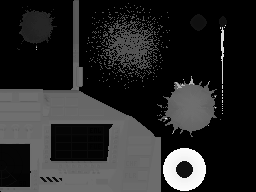
The damaged state of tripipe includes a textured quad lying on native ground level Y = 0. It spans X = −20…20 and Z = −25…15, in addition to the altered building geometry. At resource byte 1890, opcode 71 selects texture binding slot 0 with UV corners (161,76), (217,76), (217,136) and (161,136); opcode 47 draws the quad at byte 1912.
That rectangle in the extracted global_1.tm atlas contact sheet contains radial blast/crater artwork, consistent with a ground scar beneath a destroyed structure. The browser now resolves slot 0 to this atlas and preserves transparent surrounding pixels. Native captures confirm the slot table and post-lighting zero-index skip. The flat quad itself does not alter terrain geometry; inspection rendering applies no native lighting remap.
Circle particles and vertex jitter
Opcodes 92/93 draw sized circles; 95/96 draw batches. Their size word is a radius in model units. The native projection at file 0xbbf2f calculates radius * 128 / camera_depth, truncating to an integer, and passes that screen radius to the circle constructor at 0xbfd0e. The orthographic viewer instead multiplies the stored radius by its current projection scale. The previous preview's division by 100 and eight-pixel cap made explosions and smoke appear as tiny dots and discarded the size differences between stages.
The extra first word in 93/96 selects a native drawing mode. Modes 0–2 use VGA screen-door patterns of decreasing coverage, so successive smoke particles can become more sparse without changing their palette colour. The viewer preserves these patterns rather than introducing RGB alpha blending. Ordinary sized circles remain solid. Opcodes 51/52 are separate small pixel effects without a world-space radius. Only those fixed-size dots and the distant point representations carry a nonzero screen-pixel size. Sized-circle commands leave it zero so the viewer uses their authored radius; confusing these paths had briefly reduced smoke, fire glows and clouds to single pixels.
Clouds and cooling-tower steam
cloud1–cloud4 each consist of 15 overlapping sized circles, with four authored polygon-detail programs. Their distant programs progressively reduce screen coverage rather than using RGB alpha blending:
| Detail | Native distance threshold | Circle command | Drawing style |
|---|---|---|---|
| Highest | 2,000 | 95 | Solid, using palette indices 32 and 33 |
| Level 2 | 4,000 | 95 | Solid, using palette index 32 |
| Level 3 | 6,000 | 96, mode 0 | Half-coverage checker stipple |
| Level 4 | 8,000 | 96, mode 1 | Quarter-coverage stipple |
These are native header thresholds, not verified physical distances. Select Level 3 or Level 4 in the model browser’s Detail dropdown to inspect the stippled versions; its default highest-detail preview is deliberately solid. Circle radii also vary between detail programs. The Distance field supplies drawing-program distance tests; it does not automatically select a header detail level.
The cooling tower cltwr2 emits six steam circles through opcode 96, all with drawing mode 0 and palette index 127, so its steam is stippled in its sole detail program.
Cloud circles retain their authored paint order, including the differing vertex orders in cloud4. There are no per-circle facing or depth-order branches in these cloud programs. Mode 0 and mode 1 use the native scanline’s absolute Y parity and VGA plane masks, aligning the stipple to the screen across overlapping circles. Unselected pixels retain what was already drawn; selected pixels receive the current circle’s colour. Thus identical-colour stippled circles do not build up alpha opacity when they overlap. A shared status-bit-4 gate can skip a whole cloud program; the gate’s gameplay meaning has not yet been traced.
Procedural vertex jitter
Opcode 82 configures a shift for each coordinate axis. Opcode 83 defines jittered absolute vertices. Its generator at file 0xbc13a updates two 16-bit words using ADD and ADC, then applies SHL/SAR to retain a signed low-bit displacement. Shift 14 yields −2 through +1 units; shift 13 yields −4 through +3. The jitter is applied before component rotation. This animates flame polygons and the positions of smoke circles even while the selected smoke stage remains fixed.
Animate effects advances that generator at the inspection rate independently of state playback. Turning it off produces the static authored coordinates. The preview starts from the executable's stored seed words; its isolated drawing order and timing differ from the full game's shared generator state. Native frame setup at 0xc488d saves the working seed only when animation flag 0xac90 is set, then restores it before every draw. Stable-view intervening frames therefore reuse the same jitter; the viewer does not reproduce that full-frame sharing and reset.
check_model_effects.py executes the original handlers: 48 jitter cases match the browser VM exactly, including carry, coordinate wrapping and unusual shifts. 16 native circle projections confirm the radius interpretation. The captured fixtures retain the input and output values; check_native_vms.js checks the jitter fixtures against the actual browser interpreter.
Native evidence and validation
The reference executable is installs/cd_1994_09/TFX/TFX.DAT, SHA-256 2cc41a39fa95a2c9fd883c4220d7bdd9cca00c543c89b019eb270763f59d1d9a.
Useful file offsets, before runtime relocation:
- Shape loading:
0xc93bc, calling the conversion routine at0xb9f3f. - Header conversion:
0xb9f90. - Instruction conversion dispatch table:
0xba004(opcode -1 return entry immediately before it). - Runtime drawing dispatch table:
0xbb2b8. - Flat polygon rasteriser:
0xbd3a8, with winding rejection at0xbd4ba; shaded rejection:0xbda7a. - Facing test:
0xbb81c; jump/call:0xbb574/0xbb584. - Vertex projection range:
0xbcb24; absolute vertex:0xbcb64. - XYZ delta vertex:
0xbcbf8, including the previous-slot additions at0xbcc6c. - Explicit-destination XYZ delta:
0xbcc8c.
The decoder report records archive provenance and opcode counts. All 1,012 identified resources and every kind-0 detail program pass instruction bounds/layout validation. Inspection checks exercise all detail levels from multiple directions and retain separate notes about preview features still omitted. Those checks establish parser/interpreter consistency; they do not establish pixel-perfect equivalence with DOS screenshots.
The broader archive/resource breakdown is in DID extraction.
Scenery definitions and authored anchors now assemble model parts in the map and scenery browser. See terrain-and-scenery.md for the definitions, native grid orientation and collision-test metadata. The analysis index links the wider resource study.
Native branch checks
The parameter predicates are confirmed by 1,332 executions of the original x86 handlers, covering values on both sides of byte and signed-word boundaries. Opcodes 32/35 compare the operand greater than the selected parameter, 33/36 compare equal, and 34/37 compare less. Bit-mask tests use 23/24. The additional status-word handlers have their own ordering: 63/64 mask, 65/68 greater, 66/69 equal and 67/70 less. These distinctions corrected the inspection VM's earlier tentative interpretation.
check_model_conditions.py records the native decisions, and check_native_vms.js verifies that actual browser-VM geometry follows those same branches. See condition-checks.json. The same check also executes opcode 21 on 30 screen-coordinate cases, including both windings, negative coordinates and edge-on triangles; it also executes the flat polygon winding check on those same coordinates. The VM matches both the native branch and polygon-visibility decisions.
Bedford flat-bed drawing-order anomaly
In the model browser, bedford2 can paint its flat bed over the cab sides when viewed from the front quarter. The original shape resource has no opcode-21 facing branches. Its close-range drawing program uses this fixed sequence, with byte offsets relative to the resource:
| Part | Drawing instruction offsets |
|---|---|
| Cab sides | 520–590 |
| Rear of cab | 598 |
| Flat-bed top | 610 |
| Windscreen | 634 |
| Cab roof | 646 |
The bed top is geometrically behind the cab at overlapping screen positions, but its later drawing instruction covers the cab sides. The windscreen and roof are drawn afterwards, explaining why those remain visible. This points to an authored ordering error rather than reversed axes or back-face rejection. A comparison with the running DOS game is still pending, including the effect of its perspective projection and lower resolution. The viewer retains the original sequence.
Carried models and rounded polygons
Opcode 81 draws a model from the actor's ten carried-store slots at an authored vertex anchor. Its second operand is a byte offset (0, 2, …, 18) into the code-relative handle table 0x47c94. The native loadout setter 0x8b3d4 populates that table alongside the ten weapon slots used by the mass/drag accumulator. Thirty native setter cases verify occupied and empty slots.
The drawing handler 0xbc8f0 installs the anchor translation, draws the selected model with initial condition byte 0xf9, then restores translation and condition state. Empty handles are 0xffff. Twenty native cases check the ten slots, including restoration. Carried model vertices inherit the aircraft's current matrix and camera scale; independently normalising each missile would enlarge it incorrectly. Shared-scale checks cover synthetic scale changes and all ten attachment slots on efa.
The model browser now offers an explicit Carried stores inspection panel for the 18 models using this opcode. Empty slots are the default because a standalone model has no actual actor loadout. Selections show geometry at original anchors, preserving authored paint order, and are included in exports. They do not enforce aircraft weapon compatibility or reproduce saved mission loadouts. OBJ/MTL exports preserve flat materials and texture bindings; per-vertex Gouraud ramps and procedural raster patterns remain preview features.
Opcode 62 is a rounded four-vertex surface. Native 0xbc660 projects the four edge midpoints, draws their central quad and adds four corner arcs through 0xdaf50. The software preview now follows that construction, rather than filling the original sharp-cornered quad. Forty-four native curve cases match all 352 generated vertices, including negative coordinates. The orbit view uses orthographic edge midpoints; native perspective uses projected camera-space midpoints. The WebGL scenery view still treats these special surfaces as ordinary geometry.